Tłumaczymy nasz sklep na język polski!
Wymaga to jednak czasu, ponieważ w ofercie mamy dużo artykułów, a na nasz sklep składa się wiele stron. Chwilowo nasz katalog produktów dostępny będzie w języku angielskim. Dziękujemy za cierpliwość!
Tłumaczymy nasz sklep na język polski!
Search for the required item using the search bar on our website. You can search for the item using keywords, part numbers or a type code. Alternatively, look above the search bar and search by product category, brand or application. You can then configure your desired item using our product configurator.
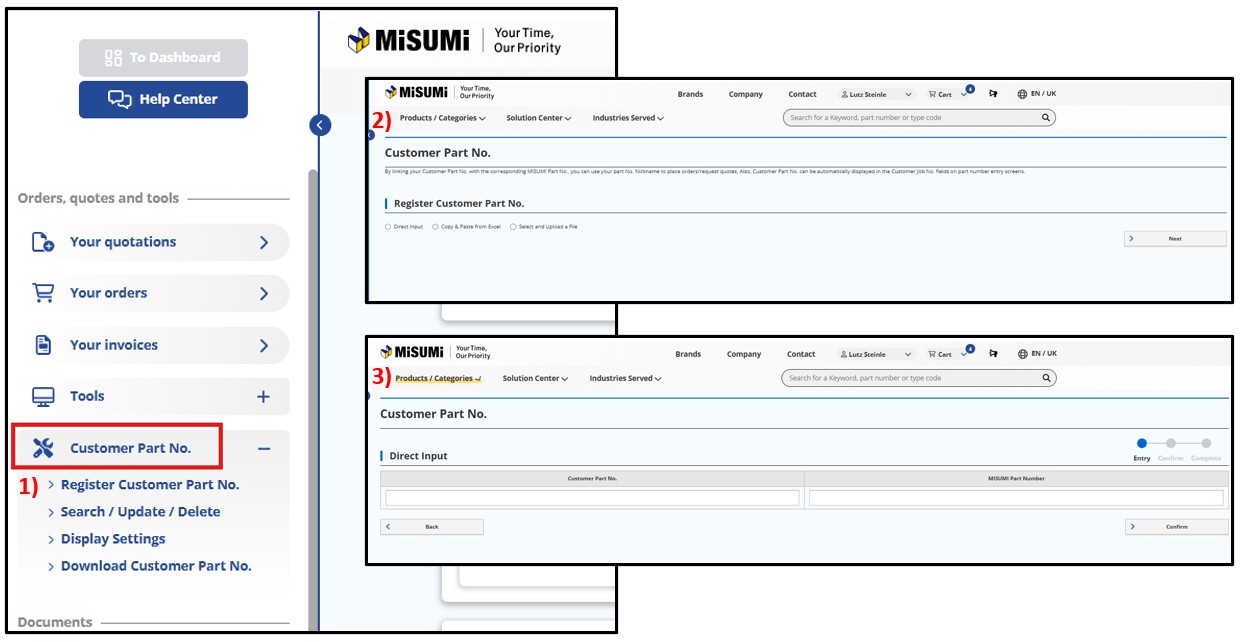
You can conveniently use the custom product names/part numbers already registered in the MyMISUMI customer portal in the MISUMI online shop for quotations and orders.
Your custom product name will automatically appear in the quotation or order as a reference number.

With the Customer Part No. function, registered users can register individual product names/part numbers and share them within their company's corporate Account.
Please proceed as follows:
All saved product names/part numbers are automatically available to all users within the same MISUMI corporate account. In addition, the data can be managed at any time, downloaded as a CSV file, and used directly in the online ordering or quotation process.
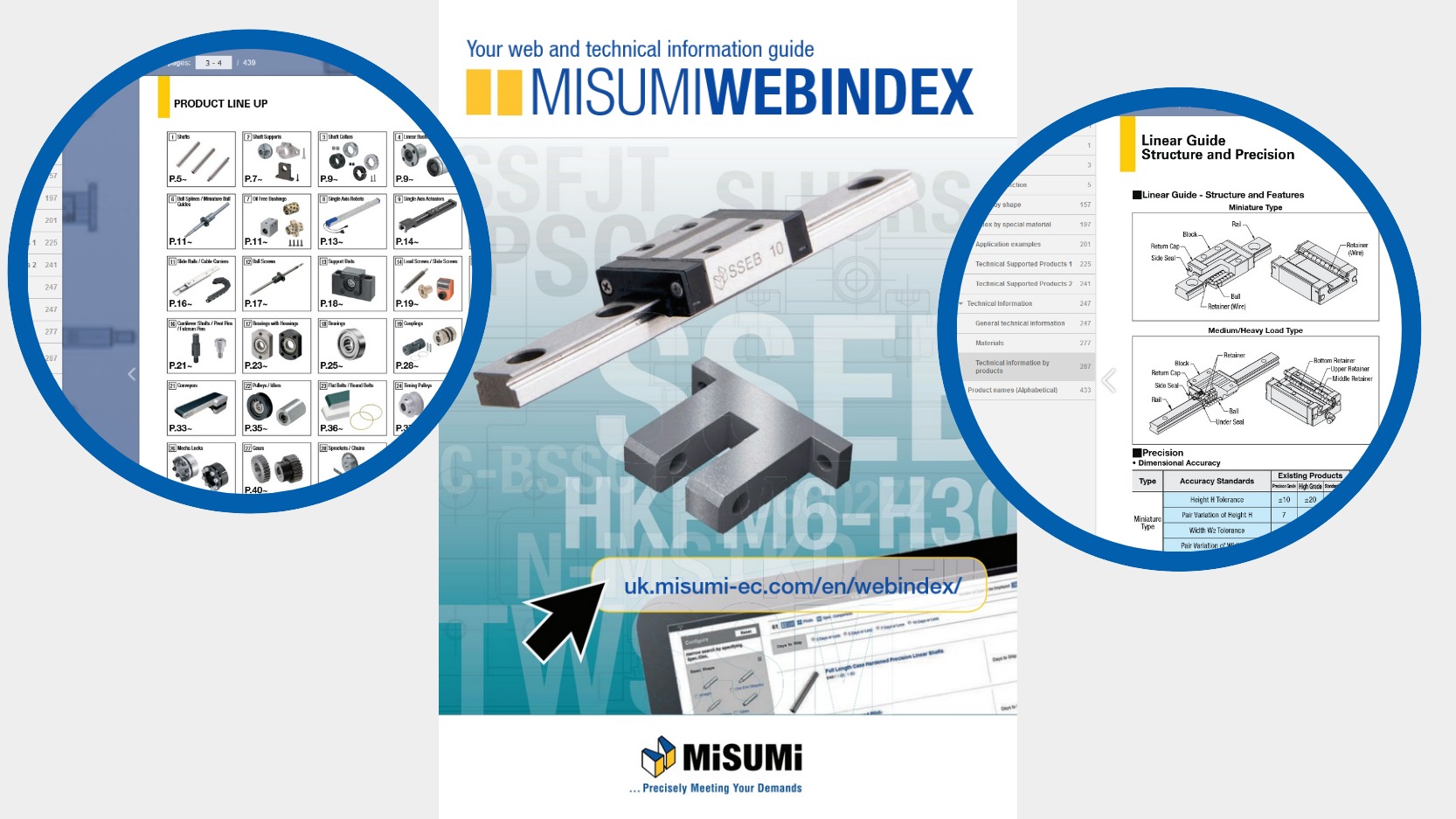
MISUMI no longer offers a catalogue in hard copy.
You can find all products from our portfolio and configure the desired parts in the online shop on our website. Special product catalogues and our MISUMI WEBINDEX can be found on the web page. If you have any questions about specific specifications or custom-made products, please contact our via the Help Center in your MyMISUMI-profile. The MISUMI WEBINDEX offers you all our product lines at a glance and navigates you to your desired products in 2 steps. Alternatively you can find your product by using the shape search. It is your online guide which includes: General engineering information (such as tolerances etc.) Material information Product technical information (e.g. load calculation on linear guides).
You can find your CAD download history in our MyMISUMI-profile under Tools in the menu on the left side. Here, you can see CAD data that has already been downloaded and download it again if necessary.
Below you will find a list of all CAD file formats available at MISUMI.
| CAD-Type | Corresponding CAD software name or file format name | File extension | Position of the pop-up menu |
|---|---|---|---|
| System-specific 3D files | Autodesk Inventor (2024, 2023, 2022, 2021) | .ipt | 3D |
| CATIA (>= V5) | .catpart | 3D | |
| CATIA Macro >= V5 | .catscript | 3D | |
| Creo Elements/Direct Modeling (>=17.0) | .lsp | 3D | |
| Creo Parametric (11, 10, 9, 8, 7, 6, 5) | .prt.1 | 3D | |
| NX (2406, 2312, 2306, 2212, 2206, 2007) | .prt | 3D | |
| Solid Edge (2024, 2023, 2022, 2021) | .par | 3D | |
| Solid Works Macro (>= 2001+) | .swb | 3D | |
| Solid Works (>= 2015) | .sldprt | 3D | |
| AutoCAD (>=V14) | .dwg | Other -> 3D | |
| Autodesk Revit (2025, 2024, 2023, 2022, 2021) | .rfa | Other -> 3D | |
| BeckerCAD | .sat | Other -> 3D | |
| Caddy++ | .sat | Other -> 3D | |
| CoCreate Modeling | .lsp | Other -> 3D | |
| IFC(2x3) | .ifc | Other -> 3D | |
| Microstation (3D) | .dgn | Other -> 3D | |
| OBJ (WaveFront) | .obj | Other -> 3D | |
| One Space Modeling (>=2007) | .lsp | Other -> 3D | |
| PARTjava | .zjv | Other -> 3D | |
| 3D intermediate files | IGES | .igs | 3D |
| Parasolid Binary (V15) | .x_b | 3D | |
| Parasolid Text (V15) | .x_t | 3D | |
| SAT (7) | .sat | 3D | |
| STEP (AP203, AP214) | .stp | 3D | |
| AutomationML | .aml | Other -> 3D | |
| AVEVA E3D | .mac | Other -> 3D | |
| Bricscad (via DWG) | .dwg | Other -> 3D | |
| COLLADA | .dae | Other -> 3D | |
| DWG >= 2013, 2010-2012, 2007-2009, 2004-2006 | .dwg | Other -> 3D | |
| DXF >= 2013, 2010-2012, 2007-2009, 2004-2006 | .dxf | Other -> 3D | |
| FBX (Filmbox) | .fbx | Other -> 3D | |
| FBX with additional data | .fbx; .json | Other -> 3D | |
| IFC4 | .ifc | Other -> 3D | |
| JT | .jt | Other -> 3D | |
| MAX 3D Studio | .3ds | Other -> 3D | |
| Mechanical Desktop | .sat | Other -> 3D | |
| MegaCAD | .sat | Other -> 3D | |
| Metafile 3D(PS3) | .ps3 | Other -> 3D | |
| PDF 3D | Other -> 3D | ||
| PRO-Desktop | .stp | Other -> 3D | |
| STL | .stl | Other -> 3D | |
| Trimble Sketchup 2017 | .skp | Other -> 3D | |
| VRML | .wrl | Other -> 3D |
| CAD-Type | Corresponding CAD software name or file format name | File extension | Position of the pop-up menu |
|---|---|---|---|
| System-specific 2D files | Auto CAD Electrical | .mdb | Other -> 2D |
| HP ME 10 | .mi | Other -> 2D | |
| 2D intermediate files | Bill of material | .xml | Other -> 2D |
| Bill of material | .json | Other -> 2D | |
| Capital | .xml | Other -> 2D | |
| DWF (A5.5, B5.5, C5.5, A6.0, UB6.0) | .dwf | 2D | |
| DWG (>= 2013, 2010-2012, 2007-2009, 2004-2006) | .dwg | 2D | |
| DXF (>= 2013, 2010-2012, 2007-2009, 2004-2006) | .dxf | 2D | |
| HPGL | .hgl | Other -> 2D | |
| Metafile 2D V1,2D(PS2) | .ps2 | Other -> 2D | |
| MI | .mi | Other -> 2D | |
| MicroStation DGN (>=V8) | .dgn | Other -> 2D | |
| 2D image/vector files, etc. | Animated GIF (ANIMGIFFILE-640x480, 640x480) | .gif | Other -> 2D |
| BMP 2D View, 3D View | .bmp | Other -> 2D | |
| JPEG 2D View, 3D View | .jpg | Other -> 2D | |
| SVG | .svg | Other -> 2D | |
| TIFF 2D View | .tif | Other -> 2D |
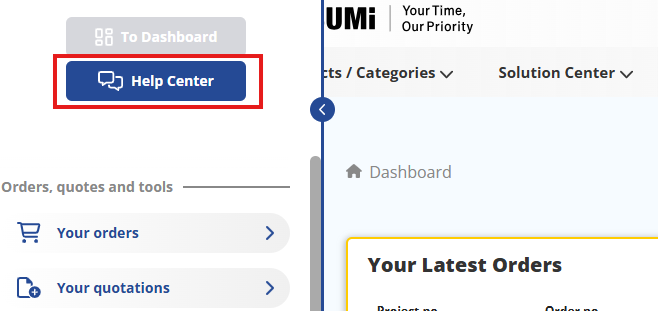
Information on our products is available directly on our product pages. You can find out how to access the product pages in the FAQ. If you require additional technical data on a specific product, please contact our technical support team via the Help Center in your MyMISUMI profile
You will find the customs tariff number and country of origin on your order confirmation. These are available to download in the MyMISUMI customer portal.